In a world where teamwork fuels innovation, the right customer relationship management (CRM) software can be the secret ingredient to your team’s success. Imagine a tool so intuitive that it seamlessly integrates into your team’s workflow, enhancing productivity and collaboration like never before. Welcome to the universe of user-friendly CRM software for teams, where every feature is designed with you in mind.
Say goodbye to the days of complex systems and cumbersome interfaces. This revolutionary approach to CRM empowers teams to focus on what truly matters: building meaningful relationships with customers. Let’s explore how embracing a user-friendly CRM can transform your team’s dynamics, streamline processes, and ultimately drive success in today’s competitive landscape.
Understanding User-Friendly CRM Features

In the fast-paced world of business, the ease of use in software can make or break a team’s productivity. User-friendly CRM features are the cornerstone of successful team collaboration and customer relationship management.
CRM software that is simple to navigate and intuitive significantly enhances team efficiency, transforming complex tasks into streamlined processes. But what exactly are the features that make a CRM truly user-friendly?
Essential Features of User-Friendly CRM Software
At the core of a user-friendly CRM is its intuitive interface. This includes a clean layout, easy access to functions, and a logical flow that mirrors real-world tasks. Features such as drag-and-drop capabilities, contextual help, and customizable dashboards empower users to tailor the system to fit their workflow, reducing the learning curve and increasing adoption rates among team members.
Examples of Intuitive CRM Interfaces
Some CRM platforms stand out for their excellent design and usability. For instance, Salesforce is renowned for its Lightning Experience, offering a visually appealing and easy-to-navigate interface. Another example is HubSpot CRM, which provides a dashboard that is not only visually intuitive but also rich with functionalities that are easily accessible. These platforms exemplify how a well-designed CRM can significantly enhance user experience.
Impact of Intuitive Design on Team Efficiency
Intuitive design in CRM software leads to increased productivity and smoother collaboration among team members. When all functions are easily accessible and processes are simplified, teams spend less time on technical hurdles and more on strategic tasks. As a result, the overall efficiency improves, leading to better customer interactions and outcomes.
Let’s take a closer look at how different CRM platforms compare in terms of user-friendly features:
| CRM Platform | User-Friendly Features | Unique Highlights |
|---|---|---|
| Salesforce | Customizable Dashboards, Drag-and-Drop | Lightning Experience for visual appeal |
| HubSpot CRM | Simple Navigation, Contextual Help | Rich functional dashboard |
| Zoho CRM | AI-Powered Assistance, Modular Interface | Seamless integration capabilities |
Benefits of User-Friendly CRM for Team Collaboration
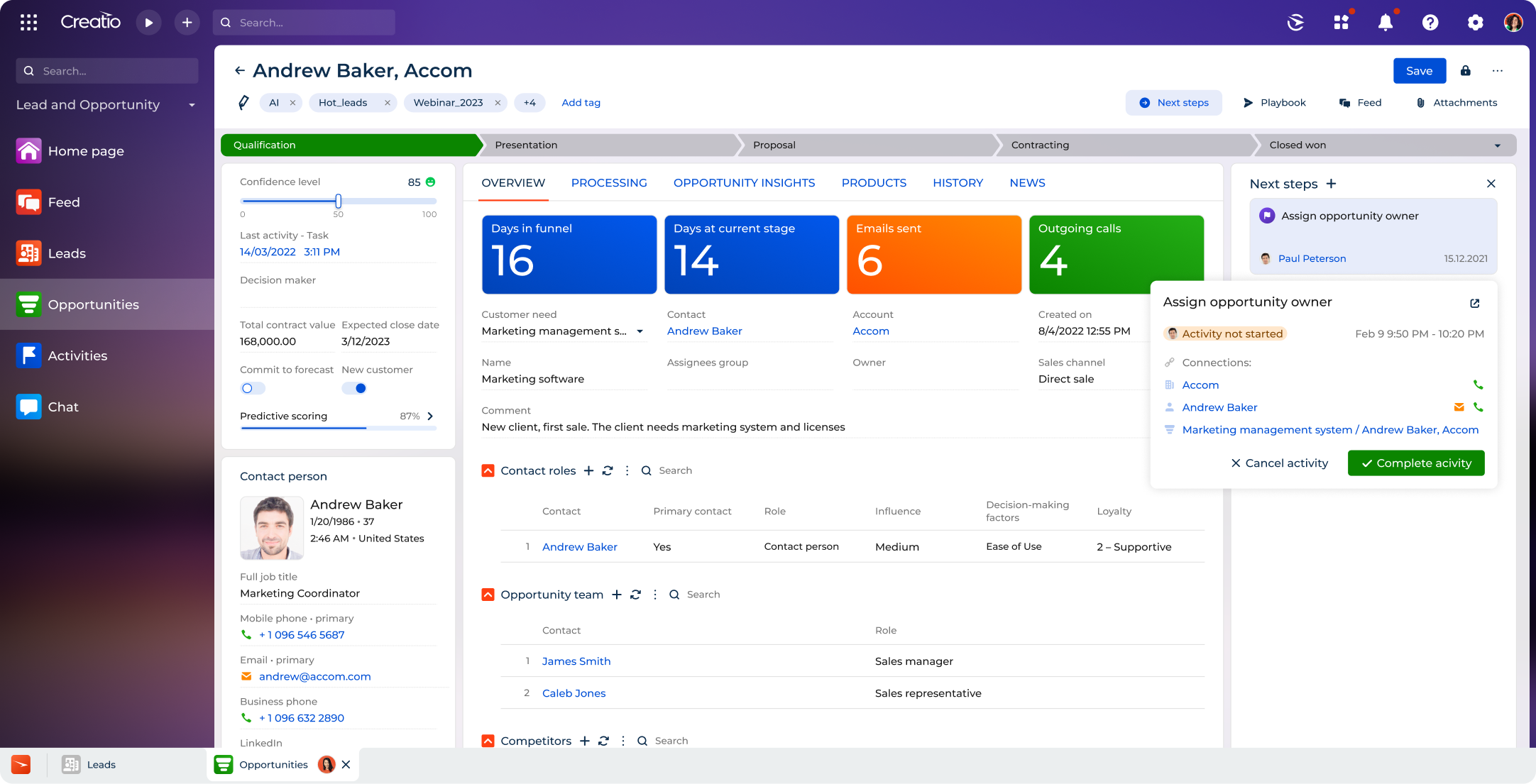
In today’s fast-paced business environment, seamless team collaboration can be the difference between success and stagnation. User-friendly CRM software is the bridge that connects teams, enhancing communication and boosting productivity.
By streamlining information sharing and automating routine tasks, user-friendly CRMs empower teams to focus on what truly matters: driving results and building stronger customer relationships. Let’s explore the transformative power of these tools in fostering collaboration.
Enhancing Communication and Workflow Efficiency
With a user-friendly CRM, teams can communicate effortlessly. These platforms centralize customer data, allowing team members to access and update information in real-time, ensuring everyone is on the same page. This reduces the time wasted on back-and-forth emails and enables teams to respond faster to customer needs.
- Real-time updates keep all departments informed.
- Integrated communication tools facilitate direct messaging within the platform.
- Task automation reduces administrative burden, allowing more focus on strategic initiatives.
Case Studies: Transforming Team Productivity
Consider the case of Tech Innovators, a mid-sized tech firm that saw a 30% increase in project completion rates after implementing a user-friendly CRM. By integrating their sales and customer service teams into a single platform, they eliminated data silos and improved inter-departmental coordination.
Another example is Green Solutions, whose marketing team doubled their campaign output by leveraging CRM-driven analytics to fine-tune their strategies in real-time.
Comparative Insights on Collaborative Features
Different CRM systems offer varying levels of collaborative tools. To help you choose the right one, here’s a comparison of three popular options:
| CRM System | Collaboration Tools | User-Friendliness |
|---|---|---|
| CRM A | Team messaging, shared calendars, document management | High |
| CRM B | Project management, collaborative dashboards | Medium |
| CRM C | Video conferencing, integrated task lists | High |
“The ease of use of our new CRM has not only streamlined our processes but also made cross-departmental collaboration a breeze.” – Jane D., Sales Manager
Customization Options in CRM for Enhanced Usability

In the bustling world of team collaboration, one size does not fit all. This is where the magic of CRM customization comes into play, offering teams the freedom to mold their tools to perfection.
Customizable CRM solutions empower teams by adapting to their unique processes and preferences. This not only enhances usability but also skyrockets efficiency by providing interfaces and workflows that resonate with the team’s operational style.
Tailoring CRM Interfaces for Optimal Team Workflows
Teams can revolutionize their workflow by customizing dashboards, fields, and reports to align with their specific needs. The ability to drag and drop components, choose from color themes, and set personalized notifications makes the CRM tool feel like a bespoke suit, tailor-made for each team member.
- Dashboard Widgets: Choose widgets that display KPIs most relevant to your team.
- Custom Fields: Create fields that capture data specific to your industry.
- Automated Workflows: Define actions triggered by specific events to streamline processes.
CRM platforms like Salesforce, HubSpot, and Zoho offer robust customization features that allow teams to build a CRM system that reflects their unique identity.
The Positive Ripple Effect of CRM Customization on User Adoption
Customization isn’t just about aesthetics or convenience; it’s about empowerment. When users see a system that speaks their language, they are more likely to embrace it wholeheartedly. According to a study, customized CRMs can lead to a 30% increase in user satisfaction and adoption rates.
| Feature | Impact |
|---|---|
| Custom Dashboards | Improved accessibility to key metrics |
| Role-Based Interfaces | Enhanced user focus and efficiency |
| Automated Alerts | Reduced manual oversight, leading to quicker response times |
As the CRM molds itself around the team’s processes,
“it becomes not just a tool, but an integral partner in success.”
Integration Capabilities with Other Team Tools
In today’s fast-paced work environment, having a CRM that seamlessly integrates with other team tools is not just a luxury, but a necessity. The power of a user-friendly CRM lies in its ability to connect effortlessly with the tools your team already uses daily.
This synergy can transform how teams collaborate, ensuring that everyone is aligned, informed, and working towards common goals.
Seamless Integration for Enhanced Team Workflows
One of the standout features of modern CRM systems is their remarkable integration capabilities. These systems are designed to work in harmony with a variety of productivity tools, enhancing workflow efficiency and fostering collaboration.
By integrating with tools like Slack, Microsoft Teams, or Google Workspace, CRM platforms facilitate communication and data sharing, allowing team members to access crucial information without switching applications. This not only boosts productivity but also minimizes the risk of miscommunication.
Imagine a scenario where a sales representative closes a deal, and this information is instantly shared with the project team through their preferred communication tool. Such seamless data flow ensures that everyone is on the same page, reducing delays and enhancing customer satisfaction.
Examples of Successful CRM Integrations
Many CRM platforms offer a wide range of integrations with popular tools. For instance:
“Salesforce integrates with Slack to streamline team communication and project management.”
“HubSpot connects with Gmail, enabling users to track emails and manage contacts directly from their inbox.”
“Zoho CRM works well with Microsoft Office suite, providing comprehensive data handling within familiar applications.”
These examples demonstrate how integrating CRM with existing tools can magnify their capabilities, providing teams with a unified platform for all their operational needs.
Comparing CRM Platforms: Integration Flexibility
When evaluating CRM platforms, it’s essential to consider their integration flexibility. Here’s a comparative table to help you determine which platform aligns best with your organizational needs:
| CRM Platform | Integration Flexibility | Popular Integrations |
|---|---|---|
| Salesforce | High | Slack, Google Workspace, Mailchimp |
| HubSpot | Moderate | Gmail, Outlook, Zoom |
| Zoho CRM | High | Microsoft Office, Trello, WhatsApp |
| Pipedrive | Moderate | Google Calendar, Asana, Slack |
An informed choice can make all the difference, enabling your team to leverage the full potential of their CRM and existing tools.
Training and Support for User-Friendly CRM Adoption
Adopting a user-friendly CRM system requires more than just installation; it demands a well-structured training and support strategy to ensure seamless integration and optimal use by teams.
Effective training and robust support are pivotal in overcoming the initial hurdles often faced when new technologies are introduced. They transform initial hesitations into enthusiastic adoption, empowering teams to exploit the full capabilities of their CRM systems efficiently.
Importance of Comprehensive CRM Training
Training is the linchpin of successful CRM adoption. It equips teams with the knowledge required to navigate and utilize the software effectively. Without adequate training, even the most intuitive CRM systems can become cumbersome, leading to user frustration and suboptimal use.
Effective CRM training programs focus not only on the basic functionalities but also delve into advanced features, thus enabling users to tailor the system to their unique workflows. This empowers teams to work smarter, not harder, and maximizes their productivity.
Available Resources for CRM Training and Support
Organizations have a plethora of resources at their disposal to facilitate CRM training and support. These resources are designed to cater to different learning styles and preferences, ensuring everyone on the team can confidently use the CRM system.
- Online Tutorials: Step-by-step guides and video tutorials are available for self-paced learning.
- Webinars and Workshops: Live sessions with CRM experts offer real-time learning and interaction.
- Documentation and FAQs: Comprehensive manuals and frequently asked questions provide quick answers and troubleshooting tips.
- On-site Training: Personalized training sessions at your location for hands-on experience.
- User Forums and Communities: Platforms for users to share insights and solutions.
Enhancing User Experience through Ongoing Support
Beyond initial training, ongoing support is crucial in maintaining a positive user experience with CRM systems. This support ensures that any issues are swiftly resolved, and users can continuously improve their proficiency and productivity.
Continuous support can take many forms, from dedicated help desks to AI-powered chatbots that provide instant assistance. Organizations that prioritize ongoing support see higher user satisfaction rates and more effective CRM utilization.
Support Options Provided by Top CRM Vendors
Let’s explore the variety of support options offered by leading CRM vendors, ensuring your team has access to the best resources.
| CRM Vendor | Support Services |
|---|---|
| Salesforce | 24/7 phone support, live chat, comprehensive knowledge base |
| HubSpot | Email support, community forums, extensive online tutorials |
| Zoho CRM | On-demand training, interactive webinars, dedicated account manager |
| Microsoft Dynamics | Personalized support plans, onsite training, detailed documentation |
“The right support transforms CRM systems from mere tools into powerful allies in achieving business success.”
Evaluating CRM Software for Your Team

Choosing the perfect CRM software for your team is akin to finding the right partner that complements your unique workflows and objectives. With a myriad of options available, evaluating CRM software becomes crucial to ensure it meets your team’s specific needs.
Understanding the intricacies of each CRM option and how they align with your team’s goals is key to making an informed decision. By focusing on certain criteria, you can streamline the selection process and choose a system that enhances productivity and collaboration.
Criteria for Evaluating CRM Software Based on Team Needs
The foundation of selecting a CRM software lies in identifying what your team specifically requires. Start by analyzing the nature of your team’s tasks, the size of your team, and the industry you operate in. Consider the following criteria:
- Scalability: Can the CRM grow with your team?
- Ease of Use: Is the interface intuitive and user-friendly?
- Cost: Does it fit within your budget while offering good value?
- Collaboration Features: Are there tools to enhance teamwork?
- Customization: Can you tailor the CRM to suit your processes?
Methods for Assessing the User-Friendliness of a CRM Platform
Evaluating the user-friendliness of a CRM platform involves more than just a cursory glance at its interface. Dive deeper into the following aspects to ensure a smooth user experience:
- Request demos or trials to test the CRM firsthand.
- Gather feedback from team members who will use the system daily.
- Evaluate the availability of training resources and ongoing support.
- Check reviews and testimonials from similar-sized businesses.
Compare Evaluation Strategies for Different CRM Options
When comparing different CRM options, it’s vital to adopt a structured approach. Here’s a simple yet effective strategy:
| Evaluation Strategy | Details |
|---|---|
| Feature Comparison | List out critical features and see how each CRM stacks up. |
| Cost-Benefit Analysis | Analyze the cost in relation to the benefits provided. |
| User Feedback Assessment | Incorporate insights and experiences from current users. |
Checklist for Teams to Follow When Selecting a CRM
A checklist ensures no stone is left unturned during your CRM evaluation process. Here’s a robust list to guide your team:
- Define team-specific requirements and goals.
- Shortlist CRM solutions that match your criteria.
- Participate in product demos and free trials.
- Engage with customer support to gauge responsiveness.
- Analyze feedback from existing users and industry experts.
- Ensure seamless integration with existing tools.
- Review the security measures in place to protect data.
“Choosing the right CRM is not just about technology; it’s about empowering your team to achieve more.”
Final Thoughts
In conclusion, investing in user-friendly CRM software for your team is not just a smart choice; it’s a strategic move towards a more efficient and cohesive work environment. With the right CRM, your team can unlock new levels of productivity, collaboration, and customer satisfaction. So, are you ready to take your team’s performance to new heights? The journey begins with choosing the right CRM that aligns with your unique needs and goals.