Imagine transforming your small business into an efficient, customer-centric powerhouse. How? By harnessing the power of CRM software tailored specifically for your needs. In an age where customer relationships dictate success, finding the right CRM can be your golden ticket to elevated business performance.
With a multitude of options on the market, your quest for the perfect CRM might feel overwhelming. Fear not! We’re here to break down the essentials, compare top contenders, and guide you through the features that can revolutionize your operations. Let’s embark on this journey to discover how CRM software can be the catalyst for your business’s success.
Key Features of CRM Software for Small Businesses
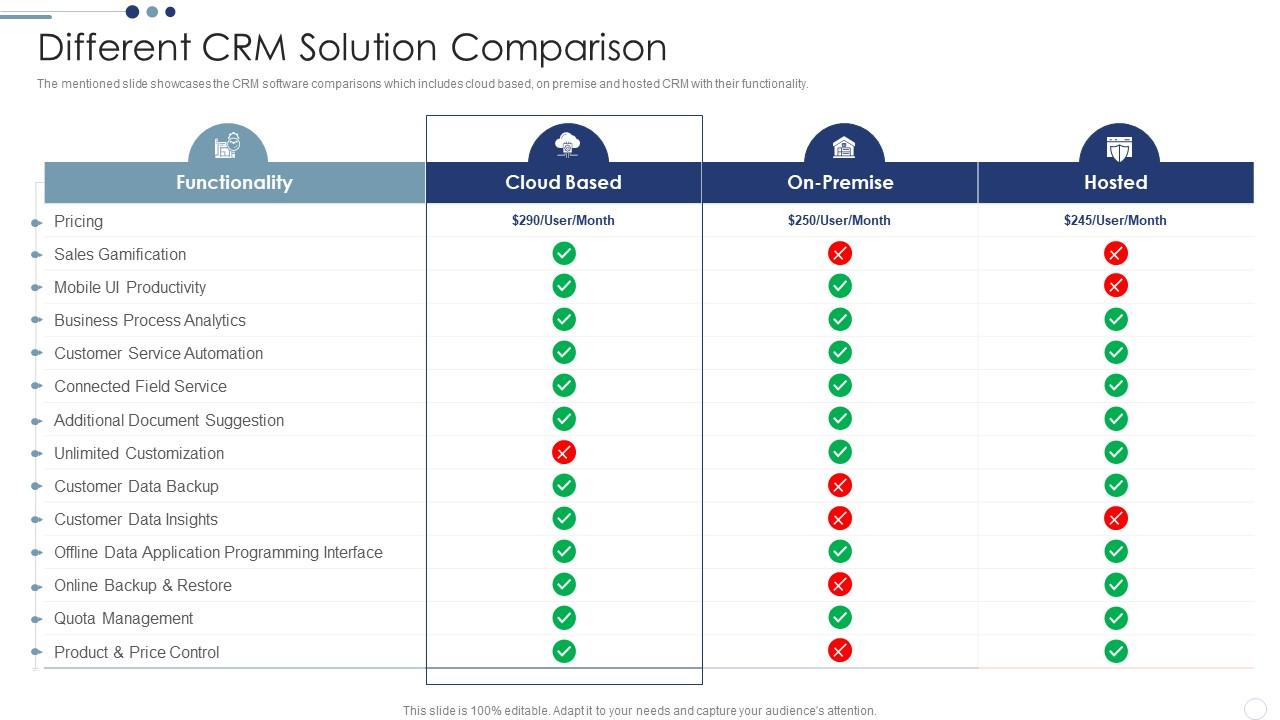
In the bustling world of small business, efficiency and customer satisfaction are paramount. CRM software is designed to address these needs, offering a suite of features tailored to streamline operations and enhance customer interactions.
This section explores the essential features of CRM software that can transform the way small businesses operate, ensuring they remain competitive and customer-focused.
Streamlined Contact Management
A central hub for all your customer information is vital. Contact Management allows businesses to store and organize customer details in an easily accessible format, facilitating better communication and personalized service.
- Quick access to customer profiles and history
- Improved customer interaction and retention
- Enhanced team collaboration and communication
Automated Task Management
Time is a valuable resource for any small business. Automated Task Management helps in scheduling and tracking tasks, ensuring nothing falls through the cracks and allowing teams to focus on high-priority activities.
- Increased productivity through task automation
- Reduction in human error and oversight
- Efficient allocation of resources
Comprehensive Reporting and Analytics
Understanding customer behavior and business performance is crucial. Reporting and Analytics features provide insights that can drive strategic decision-making and business growth.
“Data-driven decisions are the backbone of successful business strategies.”
- Identify trends and patterns in customer interactions
- Measure the effectiveness of marketing campaigns
- Optimize sales and customer service processes
| Feature | Description | Benefit |
|---|---|---|
| Contact Management | Stores and organizes customer information. | Enhances customer communication and service. |
| Task Management | Automates task scheduling and tracking. | Increases productivity and reduces errors. |
| Reporting & Analytics | Provides insights into business performance. | Facilitates informed decision-making. |
Comparing CRM Software Options

Choosing the right CRM software for your small business can feel like a daunting task. With so many options available, understanding their unique features and differences is crucial for making an informed decision.
Here, we unravel the complexities and compare popular CRM software options that are particularly well-suited for small businesses. We will dive into their key offerings, pricing structures, and support levels to ensure you find the perfect fit for your enterprise.
CRM Software Showdown: Features, Pricing and Support
In the dynamic world of small business, finding a CRM that aligns with your goals can be a game-changer. Let’s explore some of the most prominent CRM tools and uncover their distinct strengths and areas for improvement.
| Software | Features | Pricing | Support |
|---|---|---|---|
| Zoho CRM | Customizable dashboards, AI-driven tools, seamless integration with Zoho suite | Free tier available, paid plans start at $12/user/month | 24/5 live chat, email support, extensive online resources |
| HubSpot CRM | Unlimited users for free, built-in marketing tools, intuitive interface | Forever free basic plan, advanced features in paid packages starting from $40/month | Community support, tutorials, email support included in paid plans |
| Salesforce Essentials | Powerful automation, customizable reporting, cloud-based | Starts at $25/user/month; no free plan | 24/7 toll-free support, comprehensive online documentation |
Each of these CRM giants brings something unique to the table. Zoho CRM is often applauded for its affordable pricing and integration capabilities, making it a favorite for small businesses looking for value. However, its extensive features may overwhelm those new to CRM systems.
On the other hand, HubSpot’s CRM stands out for its user-friendly design and generous free offerings, uniquely catering to startups prioritizing ease of use. Yet, some businesses might find the cost of advanced features a bit steep.
Salesforce Essentials offers robust automation and customization, ideal for growing businesses with specific needs. Its comprehensive support is a major advantage, but its lack of a free plan might deter those with limited budgets.
“The key to choosing the right CRM lies in understanding what resonates with your business’s unique needs and growth trajectory.”
Integration Capabilities with Existing Systems
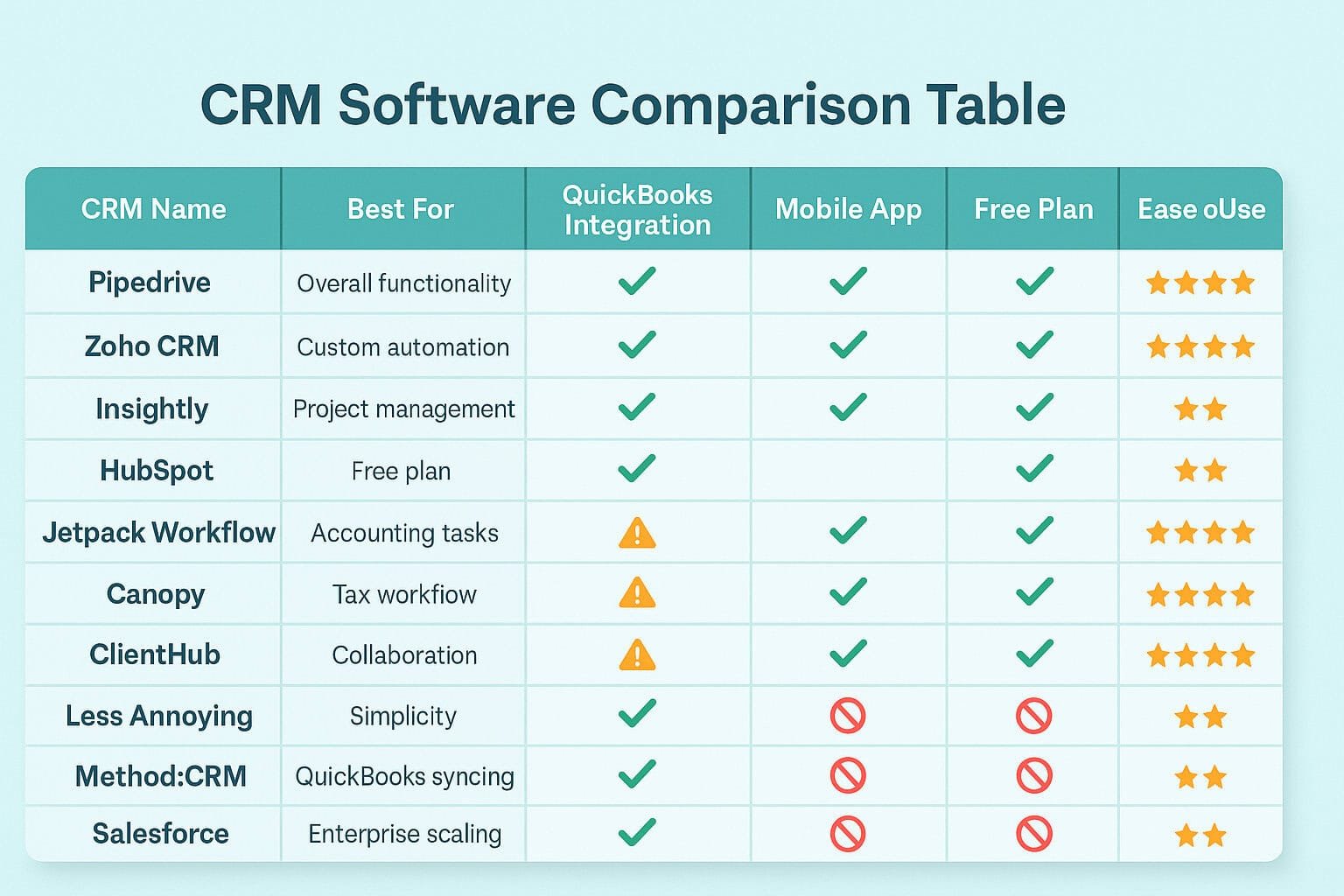
In today’s fast-paced business environment, the ability of CRM software to seamlessly integrate with existing systems can be the tipping point for its effectiveness. For small businesses, achieving harmony between CRM and other software systems is essential for a smooth flow of information and increased operational efficiency.
By enabling integration, CRM software ensures that all your business processes are interconnected, making data accessibility and management more efficient. This interconnectedness not only saves time but also enhances the accuracy of data, ultimately improving customer satisfaction and business decisions.
Common Software Integrations for Small Businesses
Small businesses often rely on a variety of software tools to manage different aspects of their operations. Ensuring that your CRM can integrate with these tools will elevate its functionality:
- Email Platforms: Integrate with platforms like Gmail or Outlook to track customer communications and streamline email marketing campaigns.
- Accounting Software: Sync with QuickBooks or Xero for seamless financial data management and invoicing.
- E-commerce Systems: Connect with Shopify, WooCommerce, or Magento to synchronize sales data and customer information.
- Customer Support Tools: Use integrations with Zendesk or Freshdesk to provide a unified view of customer interactions and support tickets.
- Social Media Management: Integrate with platforms like Hootsuite or Buffer to consolidate social media engagement data and improve customer outreach campaigns.
- Project Management Software: Connect with Asana, Trello, or Monday.com to harmonize project timelines and client communication.
Integrating your CRM with existing systems is not just about adding features—it’s about creating a cohesive ecosystem that propels your business forward. Remember,
the right integration can transform data into actionable insights, driving growth and efficiency.
Cost Analysis and Budget Considerations

When it comes to selecting the right CRM software for your small business, understanding the financial investment involved is crucial. A well-planned cost analysis can make a significant difference in ensuring that you get the best value for your money without compromising functionality.
Evaluating the cost implications involves not only the initial purchase price but also considers ongoing costs such as subscriptions, maintenance, and potential upgrades. Different CRM software offerings have varied pricing models, making it essential to compare these options carefully to align with your business budget.
Factors Influencing CRM Pricing and Budget Planning
CRM pricing can be influenced by several factors, including the number of users, features offered, and customization capabilities. For small businesses, finding a CRM solution that balances cost with essential features is key. Here are some factors to consider:
- User Licenses: Understand whether the pricing is based on a per-user basis, and if so, plan accordingly based on your team size.
- Feature Tiers: Many CRM providers offer tiered pricing with different levels of access to features. Determine which tier meets your business needs without unnecessary extras.
- Integration Costs: Consider if there are additional costs associated with integrating the CRM with your existing systems.
- Support and Training: Factor in the cost of any additional support or training your team might need to utilize the CRM effectively.
By considering these elements, you can craft a budget that supports your business goals while ensuring you don’t overspend on unnecessary features.
Cost analysis is more than just crunching numbers; it’s about strategically understanding value to make informed decisions in CRM selection.
User Experience and Customization
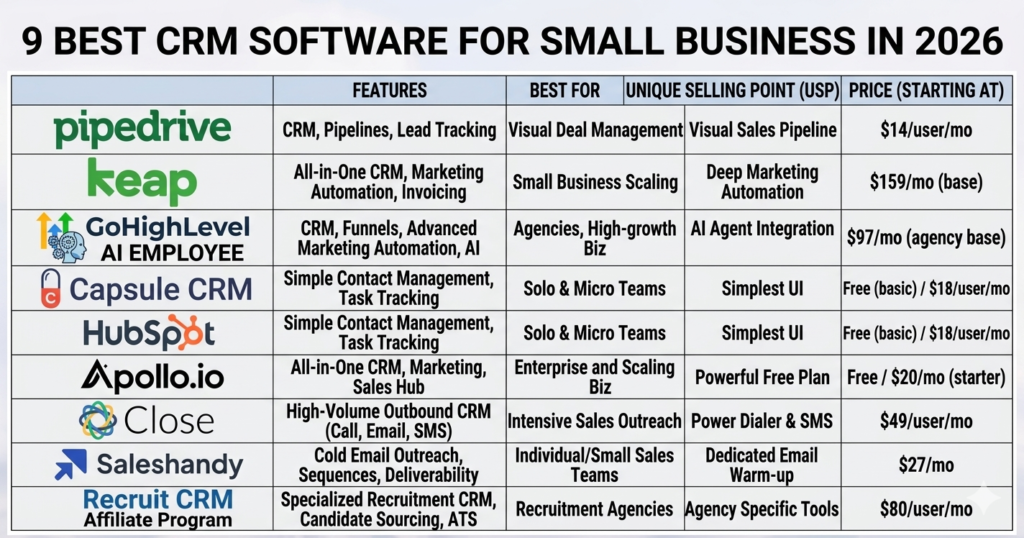
In the realm of CRM software for small businesses, user experience and customization are pivotal elements that can drive efficiency and productivity. A seamless user interface and the ability to tailor the software to specific business needs are key to unlocking the full potential of a CRM system.
For small businesses, adopting a CRM system that offers not just robust functionality but also an intuitive user experience is essential. This ensures that even those with minimal technical expertise can navigate the software with ease. In addition, customization options allow businesses to mold the CRM environment to align perfectly with their unique workflows and requirements.
Essential User-Friendly Features
When choosing CRM software, it’s crucial to consider features that enhance user experience and offer the flexibility to customize. A well-designed CRM should empower users to focus on what truly matters: building and maintaining customer relationships.
- Intuitive Dashboard: A clean and visually appealing workspace that provides easy access to key metrics and tools.
- Drag-and-Drop Customization: Allows users to effortlessly rearrange elements and design workflows that suit their processes.
- Personalization Options: Tailor interface themes, layouts, and reports to match business branding and preferences.
- Mobile Accessibility: Ensures that the CRM is as effective on-the-go as it is in the office, with a responsive design for mobile devices.
- Role-Based Access: Customizable permission settings that ensure employees have access to the tools relevant to their roles.
Case Studies of Small Businesses Using CRM
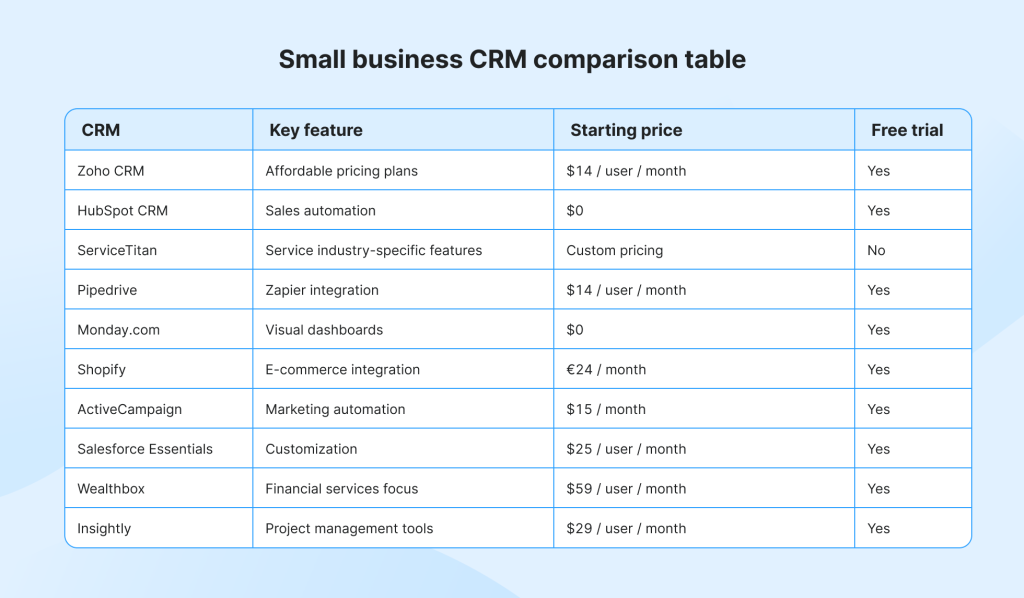
When it comes to managing customer relationships, many small businesses have found CRM software to be a game-changer. These tools not only streamline processes but also foster deeper customer connections, promoting growth and success.
In this section, we’ll delve into real-life examples of small businesses that have effectively leveraged CRM systems. By examining their journeys, we uncover the measurable improvements and the strategic enhancements they achieved.
Revolutionizing Customer Service at “The Bloom Boutique”
The Bloom Boutique, a quaint flower shop, used to struggle with keeping track of customer preferences and order histories, often leading to missed opportunities and unsatisfactory service. Implementing a CRM system allowed them to maintain a detailed customer database, enabling personalized service. Within six months, they saw a 30% increase in repeat customers and a significant boost in customer satisfaction scores.
Streamlining Sales Processes at “Tech Gurus”
For Tech Gurus, a small IT consultancy, managing leads and tracking sales stages was a cumbersome task. By adopting a CRM solution, this small business automated their sales pipeline, allowing sales representatives to focus more on converting leads rather than administrative tasks. The immediate outcome was a 25% increase in sales conversions, attributed largely to improved lead management and follow-up.
Enhancing Marketing Campaigns at “Cafe Delight”
Cafe Delight, a cozy coffee shop, faced challenges in reaching their target audience effectively. With CRM software, they could segment their customer base and create tailored marketing campaigns. This led to a 40% rise in promotional email engagement, and a 15% increase in foot traffic during campaign periods, demonstrating the power of targeted marketing efforts.
Improving Internal Collaboration at “Green Thumb Landscapes”
Green Thumb Landscapes struggled with internal communication, leading to duplicated efforts and missed deadlines. The introduction of CRM software provided a centralized platform for team collaboration. As a result, project completion times improved by 20%, and employee productivity soared, highlighting the benefits of enhanced internal communication.
Last Word

In the ever-evolving landscape of business, the right CRM software is no longer just an option—it’s a necessity. By understanding the features, costs, and integrations that suit your business, you position yourself for success. The choice you make today can pave the way for a flourishing tomorrow. So, equip your business with the tools it needs and watch it thrive like never before.